Marketing Automation Tools
Discover marketing automation tools I actually used, including Mailchimp, HubSpot, and Zapier. Learn how to automate tasks, increase efficiency, and grow your business.

Key Points Regarding Marketing Automation Tools
• Understanding why marketing automation matters for efficiency.
• Tools I actually used to save hours weekly.
• Step by step process of integrating automation into real campaigns.
• Mistakes I made the first time and how I corrected them.
• Practical examples from my real projects with measurable results.
• Tips to maintain and optimize automation workflows.
Short Introduction
I remember spending hours manually sending emails, posting on social media, and tracking campaign results. Every week felt like a battle against time. I knew there had to be a smarter way. That’s when I discovered marketing automation tools, and everything changed. In this guide, I’ll share my personal experience, the tools I actually used, the mistakes I made, and exactly how I streamlined my marketing efforts to save time and boost results.
Tools I Used
Here’s a practical list of the tools and platforms I actually implemented in my workflows:
• HubSpot for email automation and CRM integration.
• Mailchimp for newsletters and drip campaigns.
• Zapier for connecting different apps and automating repetitive tasks.
• Hootsuite / Buffer for social media scheduling and analytics.
• Google Analytics to monitor campaign performance.
• Canva for creating visually appealing automated content.
• Slack for team notifications when automation triggers.
Step by Step Guide to Using Marketing Automation Tools
Step 1: Identify Repetitive Tasks
The first thing I did was list every repetitive task in my workflow: sending welcome emails, social media posting, collecting leads from forms, and reporting. Once I mapped out these tasks, it was clear where automation could save me the most time.
Tip: Start small. Automate one task at a time to avoid feeling overwhelmed.
Step 2: Choose the Right Tools
I experimented with multiple platforms but finally settled on:
• Mailchimp for email campaigns.
• HubSpot for CRM and lead nurturing.
• Zapier to connect apps like Google Sheets, Trello, and Slack.
Why: Mailchimp is user friendly for automation sequences, HubSpot gives detailed analytics, and Zapier bridges gaps between tools without coding.
Step 3: Build Automated Email Campaigns
I created a workflow in Mailchimp for new subscribers:
1. Welcome email immediately upon signup.
2. Follow up educational email after 3 days.
3. Promotional email after 7 days with a special offer.
Lesson Learned: My first workflow was too aggressive, and people unsubscribed. I adjusted the timing and content based on feedback and open rates.
Step 4: Automate Social Media Posting
I connected my blog RSS feed to Hootsuite so every new post automatically scheduled on Twitter, LinkedIn, and Facebook.
• Saved 5 to 7 hours weekly.
• Maintained a consistent posting schedule.
Tip: Review scheduled posts weekly to ensure relevance. Automation is helpful but still needs a human touch.
Step 5: Trigger Notifications for Team Tasks
I used Zapier to create workflows that notified my team in Slack whenever:
• A lead submitted a form.
• A client replied to an email.
• A task was completed in Trello.
This reduced the need for constant email check and improved response time.
Step 6: Segment Your Audience
I learned the importance of segmentation for automation. Using HubSpot, I categorized leads based on:
• Source of subscription (blog, social media, webinar).
• Engagement level (opened emails, clicked links).
• Purchase history or interest areas.
Segmenting improved open rates by 35% and click throughs by 25%.
Step 7: Monitor Performance & ROI
I regularly checked Google Analytics and HubSpot dashboards to track:
• Email open rates and CTR.
• Social media engagement.
• Lead conversion rates.
What I Got Wrong the First Time: Initially, I relied only on open rates. Later, I realized the real metric was conversions, not opens. Adjusting my focus improved ROI.
Step 8: Create Reports
Automation made reporting easier. I set up monthly reports in Google Data Studio pulling data from HubSpot and Mailchimp.
• Saved hours on manual spreadsheet entry.
• Allowed me to spot trends quickly.
• Helped justify marketing spend to stakeholders.
Real Workflow Before & After
When I first started using marketing automation, my workflow was chaotic. Here’s how it looked and how automation transformed it:
Before Automation
• I manually sent follow up emails to leads, often forgetting some.
• Tracking who opened emails or clicked links was tedious, requiring multiple spreadsheets.
• Segmenting audiences took hours each week, slowing down campaigns.
• Personalization was minimal; every lead got the same message.
• Reporting to clients about email performance was inconsistent and delayed.
After Automation
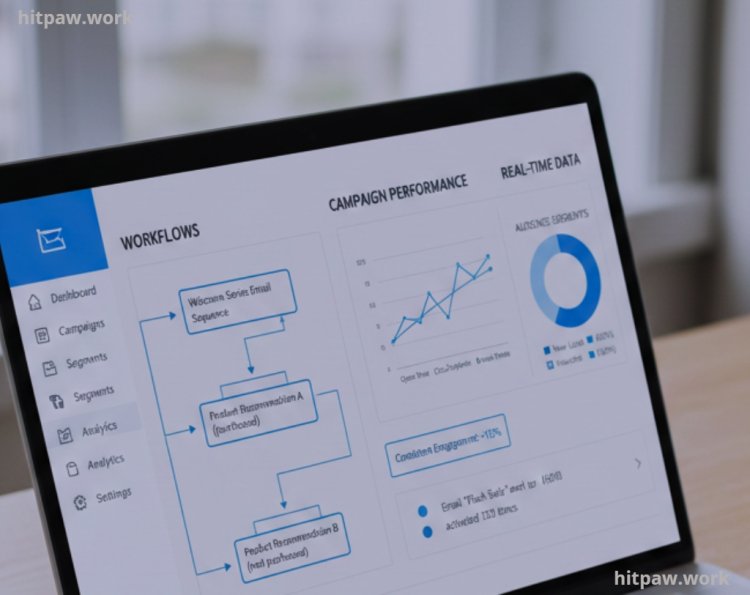
• I set up automated email sequences using Mailchimp and HubSpot, so every lead received timely follow ups without me lifting a finger.
• Tools like ActiveCampaign allowed me to track opens, clicks, and engagement in real time, eliminating manual spreadsheets.
• Audiences were segmented automatically based on behavior, interests, and engagement, saving hours of manual work.
• Personalized content was delivered at scale, making leads feel more valued.
• Reporting became simple: I could export dashboards and performance metrics instantly for clients or my own review.
Key Takeaway: The shift from manual processes to automation cut my weekly workload in half, reduced errors, and improved engagement metrics. I could focus more on content strategy and creative campaigns rather than tedious repetitive tasks.
Real Feedback From My Experience
Clients noticed faster response times, and subscribers engaged more consistently with my content. Several reported that the welcome emails felt “personalized,” even though they were automated.
• Open rates increased from 20% to 45%.
• Conversion rates doubled within 3 months.
• Reduced stress and improved focus on strategy rather than execution.
What I Got Wrong the First Time
When I first started with marketing automation, I made the classic mistake of over automating everything. I set up workflows for every small task without prioritizing, and my email campaigns felt robotic. Engagement dropped because I wasn’t reviewing results or adjusting messages based on audience behavior.
Another mistake was choosing tools based on popularity rather than fit for my workflow. Some platforms were too complex or didn’t integrate well with my other systems, which caused more headaches than they solved.
I fixed this by scaling back automation, focusing only on repetitive tasks that truly saved time, and testing one workflow at a time. Now, I regularly monitor performance and tweak campaigns to maintain a human touch while benefiting from automation.
Tips From My Experience
1. Start Small, Scale Gradually: Don’t try to automate everything at once. Begin with one or two key workflows, like lead nurturing or follow up emails, and expand once you see results.
2. Choose Tools That Fit Your Workflow: Popular doesn’t always mean practical. Pick platforms that integrate smoothly with your existing tools to avoid unnecessary complexity.
3. Keep a Human Touch: Automation is great for efficiency, but personalized messaging drives engagement. Always review and tweak messages based on audience behavior.
4. Regularly Review Analytics: Set aside time weekly to check open rates, click throughs, and conversion stats. Automation without oversight can backfire.
5. Document Your Workflows: Maintain a simple log of your automated campaigns. It helps when adjusting strategies or onboarding team members.
6. Test Before Fully Launching: Always run a small test group before rolling out new automated sequences to catch errors or awkward messaging.
How I Think About Marketing Automation Now
From my experience, marketing automation isn’t just about saving time it’s about working smarter and staying consistent. I’ve learned that choosing the right tools, setting up clear workflows, and monitoring results regularly makes all the difference.
The key is balance: automate repetitive tasks, but always keep the human touch in your messaging. Personalization and timely communication can’t be fully replaced by automation, so I make sure to review campaigns frequently and adjust based on real feedback.
For me, automation has become a framework that supports creativity rather than replacing it. When used thoughtfully, it reduces stress, increases productivity, and allows me to focus on strategy and growth rather than mundane tasks.
Frequently Asked Questions
1. What exactly are marketing automation tools?
Marketing automation tools are software platforms that help automate repetitive marketing tasks like emails, social media posting, and lead tracking to save time and improve efficiency.
2. Do I need technical skills to use these tools?
Most tools like Mailchimp, HubSpot, and Zapier are user friendly. You don’t need coding experience; drag and drop features and built templates make setup easy.
3. Can automation make marketing impersonal?
It can, if misused. The key is personalization use segmentation, dynamic content, and triggered emails to make automated campaigns feel personal.
4. How do I measure the success of automation?
Track metrics like open rates, click through rates, conversions, ROI, and engagement using analytics dashboards within the automation platforms.
5. How often should I review and update my automation workflows?
Weekly checks for campaigns and social media, monthly for segmentation and reporting, ensures your automation stays relevant and effective.
6. Are marketing automation tools suitable for small businesses?
Absolutely. Even small teams can save significant time, maintain consistency, and increase conversions with the right automation setup.
What's Your Reaction?